
TL;DR: X still gives no native way to save a video from a post, so a Chrome extension that adds a one click download button is the fastest fix in 2026.
- Media Harvest and X Media Downloader stand out for privacy, since both process video locally instead of routing files through a third party server.
- Extensions like X Video Downloader and Plucker XBD add batch downloading, letting you pull every video from a profile’s Media tab in one pass.
- Tools built specifically for X, rather than generic video grabbers, detect quote tweet videos and GIFs more reliably, since X serves GIFs internally as silent MP4 files.
X removed the right click save option on video years ago, and the official Share button still produces a lower quality clip with a watermark and the poster’s handle burned into the corner. That leaves anyone who wants to archive a viral clip, a breaking news video, or a client’s own posted content stuck copying links into random websites. Chrome extensions solve this cleanly by adding a download button directly into the X interface.
This article covers eight Chrome extensions built specifically for downloading video from X, formerly Twitter, tested for detection reliability across feeds, replies, quote tweets, and profile pages. It is written for social media managers, content archivists, and marketers who need a repeatable way to save X video without relying on a third party website every time.
1. X Video Downloader
X Video Downloader is a Chrome extension built for pulling the highest bitrate MP4 that X makes available for a given post. It adds a download control to individual tweets and also supports batch downloading from a profile’s Media, Original Posts, or Reposts timeline.
The differentiator here is the batch mode. Instead of opening each post one at a time, you can point X Video Downloader at a full profile and pull every video in one run, with custom folders and optional tweet ID subfolders for organization.
This fits content archivists and social teams who need to save an entire account’s video history rather than a single clip.
2. Media Harvest
Media Harvest is a widely used X and TweetDeck media downloader, currently sitting near 100,000 users on the Chrome Web Store with a 4.5 rating. It downloads both videos and images with a single click and adds a keyboard shortcut for faster repeat use.
The differentiator is TweetDeck support alongside standard X.com, plus a custom filename option and the ability to reveal sensitive content automatically before saving. Media Harvest states it does not act as a web crawler, which keeps its footprint smaller than tools that scan entire timelines in the background.
This is a strong fit for anyone who splits their time between X.com and TweetDeck and wants one extension that covers both.
3. X Media Downloader
X Media Downloader focuses on original quality output and local processing. The developer discloses that all processing happens on your device, with nothing sent to an external server, which matters if you are saving media tied to client work or unreleased campaigns.
The differentiator is the combination of batch profile downloads and custom folder naming in the same tool, letting you save an individual post or an entire profile’s media library without switching extensions. Setup requires no login to X.
This fits users who prioritize privacy and want batch downloading without creating a separate account anywhere.
4. Twitter Media Downloader (ricciflow.io)
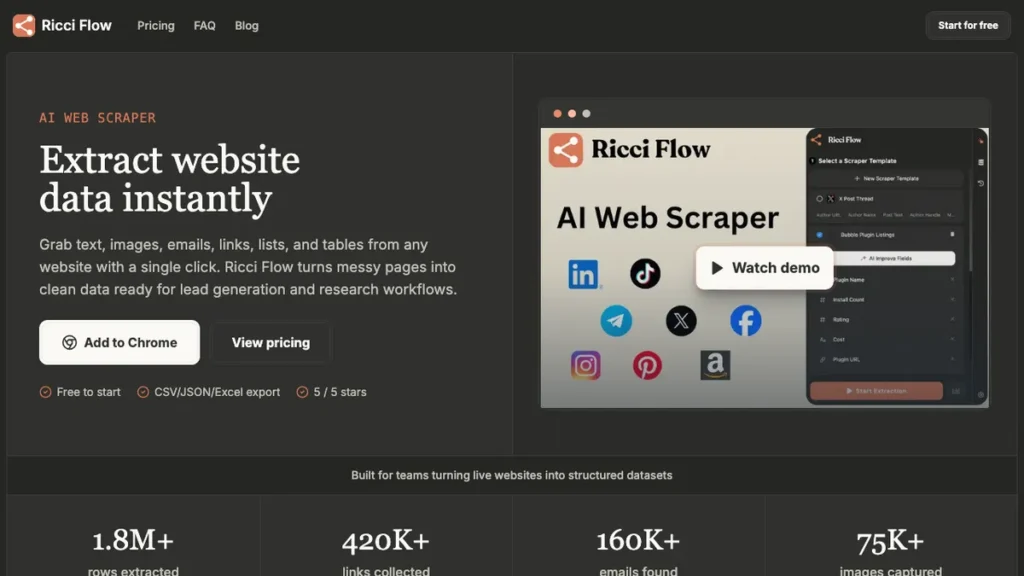
This version of Twitter Media Downloader, published by ricciflow.io, targets bulk export from profile Media tabs. Opening a profile, going to the Media tab, and clicking the download button triggers a batch save of everything visible.
The differentiator is the straightforward profile first workflow. Rather than optimizing for single tweet grabs, it is built around pulling a creator or brand account’s full media history in one pass.
This fits marketers doing competitive research who need a fast way to review a competitor’s recent video output.
5. Plucker XBD
Plucker XBD adds one click multi download for both images and videos, along with a side panel that previews media on the current page before you save it. It also includes duplicate detection, so files you have already downloaded are skipped automatically.
The differentiator is the combination of a preview panel and history tracking. You can see everything on a page, choose what to save, and revisit previously downloaded media inside the extension itself instead of digging through your downloads folder.
This fits users doing repeated research or moderation work who need to track what has already been captured.
6. X (Twitter) Video Downloader
This extension adds a Download icon directly next to the like, retweet, and share buttons under a video, which keeps the workflow close to how X already looks. Clicking it saves the MP4 straight to your default downloads folder.
The differentiator is simplicity. It also handles GIFs and photos alongside video, and the developer is explicit that the extension is independent and not affiliated with X Corp.
This fits casual users who want the smallest possible learning curve and do not need batch or profile level downloading.
7. X Downloader
X Downloader, from the browser-extensions developer, extends its download button into TweetDeck as well as the standard X interface. It is built to keep working whether you manage posts from the main site or from TweetDeck’s column view.
The differentiator is that TweetDeck compatibility, which several competing extensions do not support. For anyone managing multiple accounts through TweetDeck, that consistency avoids switching tools depending on which view you are in.
This fits social media managers who run TweetDeck as their primary workspace.
8. Video Downloader Pro
Video Downloader Pro detects video across tweets, replies, profile pages, and search results, and it specifically handles quote tweet videos, which some competing tools miss. It also treats GIFs correctly, since X actually serves GIFs internally as silent MP4 files rather than true animated GIFs.
The differentiator is watermark free output even on the free tier, where five downloads per week are included before any paid limit applies. Independent testing that compared six X focused extensions on detection reliability and watermark behavior named this the most consistent option overall.
This fits users who mainly need single video downloads but want the most reliable detection across every page type on X.
Which Twitter/X Video Downloader You Should Actually Use
Most people land on this list looking for one answer, not eight. The right pick depends less on features and more on what you are actually trying to save, since a single viral clip and a full profile archive call for different tools.
Choose Based on Your Use Case
Single video, occasional use: X (Twitter) Video Downloader or Video Downloader Pro gets you a clean MP4 in one click with the least setup.
Bulk profile archiving: X Video Downloader or X Media Downloader handle full profile Media tabs in one pass with folder organization built in.
Privacy sensitive work: X Media Downloader and Media Harvest both process files locally, so client or campaign media never routes through a third party server.
TweetDeck users: X Downloader and Media Harvest are the two options that confirmed TweetDeck support alongside standard X.com.
GIF and quote tweet accuracy: Video Downloader Pro specifically detects quote tweet videos and treats GIFs as the silent MP4 files they actually are on X.
How to Download a Video From X in Chrome
Step 1: Pick an extension from the list above Match the tool to your use case using the recommendation section, since single video tools and bulk profile tools are not interchangeable.
Step 2: Install from the Chrome Web Store Search the extension name in the Chrome Web Store, click Add to Chrome, then confirm by clicking Add extension in the popup that appears.
Step 3: Open X and find the video Go to X.com and navigate to the tweet, reply, quote tweet, or profile Media tab containing the video you want to save.
Step 4: Locate the download control Most extensions add a download icon near the video itself or near the like, retweet, and share row underneath a post.
Step 5: Click download Click the icon, and the extension saves the MP4 to your browser’s default downloads folder, or to a custom folder if the extension supports that setting.
Step 6: Check the file Open your downloads folder to confirm the video saved at full quality, since a small handful of extensions on the Chrome Web Store are inconsistent and worth uninstalling if the output is degraded or watermarked.
Conclusion
X still has not added a native download button in 2026, so a Chrome extension remains the practical way to save video from the platform. Video Downloader Pro and X (Twitter) Video Downloader cover single video needs well, while X Video Downloader and X Media Downloader are the stronger picks once you need to archive an entire profile.
Privacy conscious users should lean toward extensions that confirm local processing, since that detail is usually disclosed directly on the Chrome Web Store listing. Whichever tool you pick, test it on a quote tweet and a GIF first, since those two formats are where the weaker extensions tend to fail.
Frequently Asked Questions
Which X video downloader is best for saving an entire profile’s videos?
X Video Downloader and X Media Downloader both handle full profile Media tab downloads in one pass with folder organization built in, rather than requiring one link at a time.
Is there a free option for downloading X videos?
Yes. Video Downloader Pro includes five downloads per week on its free tier with watermark-free output, and most other extensions on this list, like Media Harvest and X (Twitter) Video Downloader, are free to install and use.
Which extension is best for privacy-conscious downloading?
X Media Downloader and Media Harvest both process video locally on your device rather than routing files through a third-party server, which matters for client work or unreleased campaigns.
Which tool works best with TweetDeck?
X Downloader and Media Harvest are the two extensions on this list that confirmed TweetDeck support alongside standard X.com.
Which downloader handles GIFs and quote tweets most reliably?
Video Downloader Pro specifically detects quote tweet videos, which some competing tools miss, and correctly treats GIFs as the silent MP4 files X actually serves internally rather than true animated GIFs.
How popular is Media Harvest compared to the other extensions?
Media Harvest sits near 100,000 users on the Chrome Web Store with a 4.5 rating, making it one of the more widely adopted options covered here.
You May Also Like
Best AI Tools for Digital Marketers: a roundup of AI tools built for marketing teams managing multiple channels.
Social Media Marketing Roadmap: a step by step path for building a social media strategy from scratch.
Surfshark VPN Review: a look at using a VPN alongside browser extensions for more private browsing.