
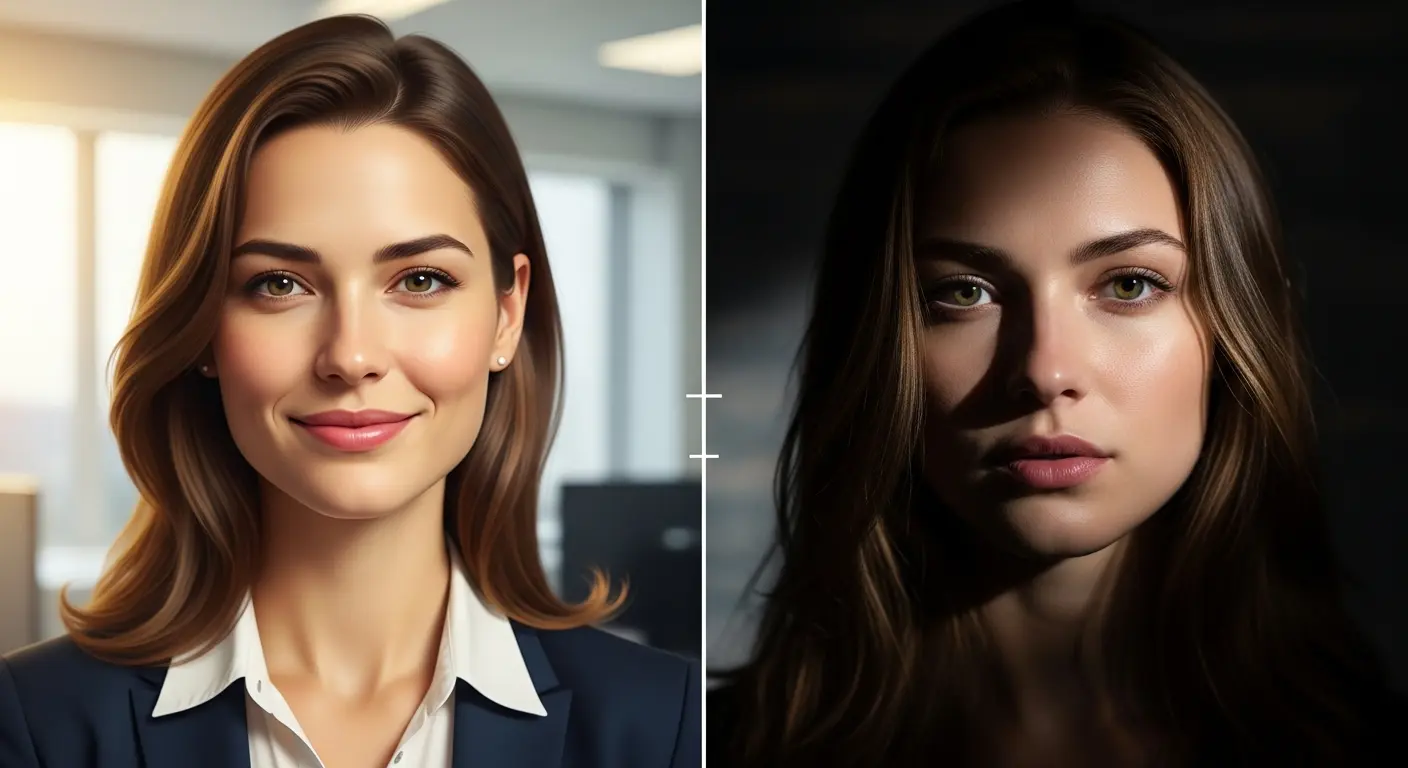
Choosing between Adobe Firefly and Midjourney depends on your priorities: commercial safety and workflow integration versus artistic excellence and creative flexibility. Both AI image generators have distinct strengths that serve different creative needs. This comparison breaks down everything you need to know to make the right choice.
Quick Overview
Adobe Firefly is Adobe’s commercially safe AI image generator trained exclusively on licensed Adobe Stock content, Creative Commons material, and public domain images. It integrates directly with Creative Cloud applications and offers text-to-image, text-to-video, and text-to-vector capabilities.
Midjourney is an independent AI art generator known for producing exceptionally artistic and visually striking images. It operates primarily through Discord and a web interface, with a community of over 20 million users.
Feature Comparison Table
| Feature | Adobe Firefly | Midjourney |
|---|---|---|
| Latest Model | Image Model 4 Ultra | Version 7 (June 2025) |
| Max Resolution | 2000 x 2000 pixels | 2048 x 2048 pixels |
| Text-to-Image | Yes | Yes |
| Text-to-Video | Yes (5 seconds) | No (images only) |
| Text-to-Vector | Yes | No |
| Text Rendering | Good | Improved in V7 |
| Commercial Safety | Guaranteed (licensed data) | Uncertain (training data disputed) |
| Creative Cloud Integration | Full integration | None |
| Interface | Web app, Mobile app | Discord, Web editor |
| Partner Models | Google Imagen 3, OpenAI, Flux | None |
For those exploring other AI tools, the Flux vs Midjourney vs DALL-E 3 comparison provides additional context on how these platforms stack up.
Image Quality Comparison
Adobe Firefly Image Model 4 Ultra Firefly’s latest model produces photorealistic images with excellent detail in human portraits, architectural elements, and product shots. It handles complex prompts accurately and maintains consistency across generations. The Ultra model excels at:
- Professional headshots and portraits
- Product photography
- Brand-consistent marketing visuals
- Clean, commercial-ready outputs
For portrait-specific prompts, explore 15 Adobe Firefly prompts for portrait photos.
Midjourney Version 7 Released April 2025, Midjourney V7 represents the pinnacle of artistic AI generation. It produces images with exceptional mood, atmosphere, and stylistic coherence. Key improvements include:
- Richer textures and coherent details
- Better handling of bodies, hands, and objects
- Draft Mode for 10x faster generation
- Stunning precision in prompt interpretation
Midjourney consistently produces more visually striking and artistic results, while Firefly delivers cleaner, more production-ready outputs.
Pricing Comparison
| Plan | Adobe Firefly | Midjourney |
|---|---|---|
| Free/Trial | 25 credits/month | No free tier |
| Entry Level | $9.99/month (2,000 credits) | $10/month (3.3 hrs GPU) |
| Mid Tier | $29.99/month (7,000 credits) | $30/month (15 hrs GPU) |
| Professional | $199.99/month (50,000 credits) | $60/month (30 hrs GPU) |
| Enterprise | Custom pricing | $120/month (60 hrs GPU) |
Cost Analysis:
- Adobe Firefly Standard ($9.99) generates approximately 2,000 images or 20 five-second videos monthly
- Midjourney Basic ($10) produces around 200 images monthly with fast GPU time
- Creative Cloud subscribers receive 4,000 monthly Firefly credits included
For budget-conscious creators, how to use Flux for free offers an alternative approach.
Commercial Usage and Copyright
Adobe Firefly: Clear Commercial Rights Adobe trained Firefly exclusively on:
- Licensed Adobe Stock images
- Creative Commons content
- Public domain material
This approach eliminates copyright concerns for commercial projects. Enterprise users receive IP indemnification, providing legal protection against infringement claims. Content Credentials enable transparent disclosure of AI involvement.
Midjourney: Disputed Training Data Midjourney’s training data sources remain less transparent. In June 2025, Universal Pictures and Disney filed copyright infringement lawsuits against Midjourney. Warner Bros. Discovery followed with additional legal action in September 2025. While Midjourney offers commercial usage rights with paid plans, the ongoing litigation creates uncertainty for risk-averse businesses.
For projects requiring text-heavy designs with clear commercial rights, consider Ideogram for text in images.
Workflow Integration
Adobe Firefly Advantages:
- Direct integration with Photoshop, Illustrator, Premiere Pro
- Generative Fill and Generative Expand in Photoshop
- Seamless export to Creative Cloud apps
- Firefly Boards for collaborative moodboarding
- Mobile app for on-the-go creation
Midjourney Advantages:
- Vibrant Discord community for inspiration
- Web editor with consolidated editing tools
- Style reference codes for consistent aesthetics
- Character reference for maintaining character consistency
- Real-time feedback from community members
Creative Cloud users benefit significantly from Firefly’s native integration. Standalone creators may prefer Midjourney’s community-driven approach.
Ease of Use
Adobe Firefly: Clean, intuitive web interface designed for individual productivity. Settings panels offer precise control over aspect ratio, content type, and visual style. The learning curve is minimal for users familiar with Adobe products.
Midjourney: Requires familiarity with Discord commands or web interface navigation. Prompting in V7 demands more explicit, natural language descriptions. The Discord-based approach fosters community learning but may feel unfamiliar to newcomers.
Prompting Differences
Firefly Prompting Tips:
- Use content type settings (Photo, Art, Graphic) to guide output style
- Specify lighting, camera angle, and mood explicitly
- Leverage style reference images for consistency
- Advanced settings allow excluding unwanted elements
Midjourney Prompting Tips:
- Write naturally and be explicit about desired outcomes
- Avoid generic terms like “award winning” or “8K”
- Use parameters like –style raw for literal interpretations
- Character weight (–cw) controls facial feature consistency
For detailed prompt guidance, the Complete Adobe Firefly Guide covers effective prompting strategies.
Unique Capabilities
Firefly Exclusive Features:
- Text-to-video generation (5-second clips)
- Text-to-vector for scalable graphics
- Adobe Firefly text effects for typography
- Partner model access (Google Imagen, OpenAI, Flux)
- Custom model training for brand consistency
Midjourney Exclusive Features:
- Draft Mode (10x faster at half cost)
- Omni Reference for style control
- Vary Region for selective editing
- Pan and zoom capabilities
- Remix mode for iterative refinement
Who Should Use Which Tool
Choose Adobe Firefly If You:
- Need guaranteed commercial safety
- Already use Creative Cloud applications
- Require text-to-video or text-to-vector capabilities
- Work with enterprise compliance requirements
- Prioritize workflow integration over artistic flair
Choose Midjourney If You:
- Prioritize artistic quality and visual impact
- Want community-driven inspiration and learning
- Create concept art, illustrations, or digital art
- Need extensive customization parameters
- Value creative exploration over commercial safety
Best of Both Worlds
Many professionals use both tools strategically:
- Ideation Phase: Midjourney for artistic exploration and concept development
- Production Phase: Firefly for commercial refinement and Creative Cloud integration
- Specialized Needs: Ideogram for logo design when text accuracy matters
For fantasy and artistic projects, 20 Adobe Firefly prompts for fantasy art demonstrates Firefly’s creative potential beyond commercial applications.
Verdict
Adobe Firefly wins for commercial projects, enterprise use, and Creative Cloud integration. Its guaranteed IP safety and seamless workflow make it indispensable for agencies, marketing teams, and businesses requiring legal certainty.
Midjourney wins for artistic excellence, creative exploration, and visual impact. Its community-driven development and exceptional aesthetic understanding make it the choice for digital artists, concept designers, and creators prioritizing artistic quality.
Neither tool is universally superior. Your choice depends on whether commercial safety and integration matter more than artistic excellence and community engagement.
Related Comparisons:
- Flux AI Image Generator Guide
- 25 Flux prompts for photorealistic photos
- Ideogram vs Midjourney for text
Frequently Asked Questions
Which tool wins for commercial projects, Adobe Firefly or Midjourney?
Adobe Firefly wins for commercial projects because it’s trained exclusively on licensed Adobe Stock content, Creative Commons material, and public domain images, giving guaranteed commercial safety, while Midjourney’s training data is disputed and it faced copyright lawsuits from Universal Pictures, Disney, and Warner Bros. Discovery in 2025.
Which tool produces more artistic, striking images?
Midjourney Version 7 consistently produces more visually striking and artistic results with richer textures and stylistic coherence, while Firefly delivers cleaner, more production-ready outputs.
How do Adobe Firefly and Midjourney pricing compare?
Firefly’s Standard plan is $9.99/month for 2,000 credits (about 2,000 images or 20 five-second videos), while Midjourney’s Basic plan is $10/month for roughly 200 images. Firefly also offers a free tier with 25 credits/month, which Midjourney does not have.
Does Midjourney offer video or vector generation like Firefly?
No. According to the comparison table, Firefly supports text-to-video (5 seconds) and text-to-vector generation, while Midjourney offers neither, producing images only.
What unique features does Midjourney have that Firefly lacks?
Midjourney offers Draft Mode for 10x faster generation, Omni Reference for style control, Vary Region for selective editing, pan and zoom capabilities, and Remix mode for iterative refinement.
Can I use both Adobe Firefly and Midjourney together in one workflow?
Yes, the article describes a common workflow where creators use Midjourney for artistic ideation and concept exploration, then switch to Firefly for commercial refinement and Creative Cloud integration.