
Tired of expensive influencer fees? Speel creates realistic video ads with AI actors. Get 3.6x ROAS without hiring anyone.
Real brands use this. Reebok. Golian. American Eagle. Generate millions in revenue.
This complete guide shows you everything. The 5-step process. Custom GPTs. Real results.
What Is Speel?
Speel creates video ads using AI actors. No real people needed.
Think of it like this: You write a script. AI creates the entire video. Actors look real. Sound natural.
No need for:
- Hiring influencers
- Film crew
- Video equipment
- Actor fees
- Studio rental
- Multiple takes
Just your product. Your script. That’s all.
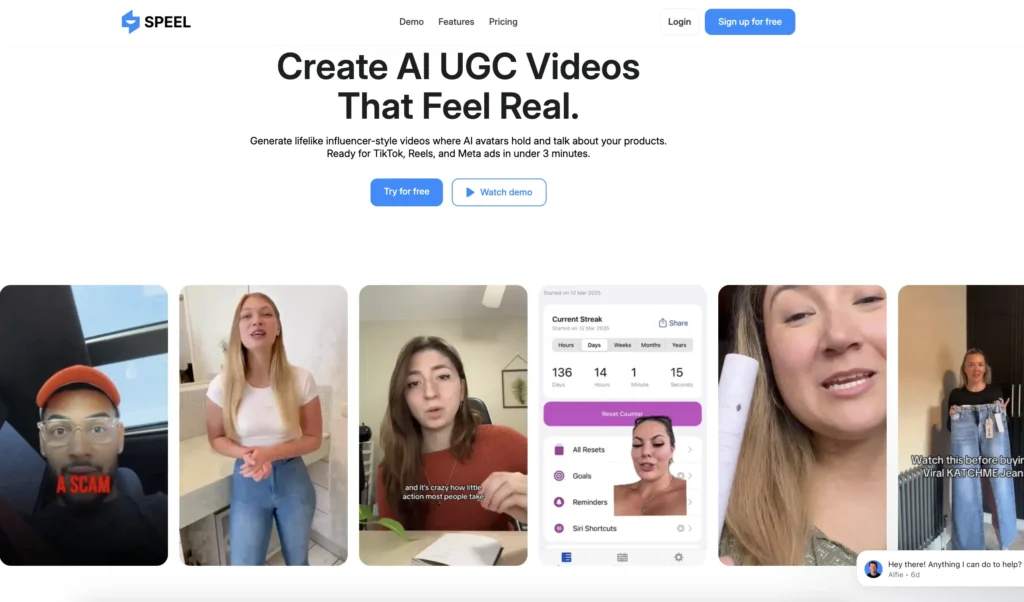
Why AI UGC Ads Actually Work
Most people say “AI ads don’t work.” They’re wrong.
Real data proves it:
Personal ROAS: 3.6x return on ad spend Big brands using AI: Reebok, Golian, American Eagle Revenue generated: Millions of dollars
Why they work:
- Look authentic
- Cost almost nothing
- Test unlimited variations
- Scale instantly
- Never run out of creators
Technology improves daily. Results get better.
What Makes Speel Different
Tons of AI video tools exist. Speel stands out.
Unique features:
Consistent AI Actors Same person in every frame. No weird changes. Perfect continuity.
World’s Best Lip-Sync Lips match words perfectly. Looks completely natural.
Image Editing Built-In Uses Nano Banana. Edit actors easily. Hold products. Change expressions.
Easy and Custom Modes Simple for beginners. Powerful for pros. Choose your level.
Multiple Video Models Different tools for different needs. All in one place.
The 5-Step Process to 3.6x ROAS
Follow this exact method. Get amazing results.
Step 1: Write Scripts That Don’t Suck
Don’t write manually. Use AI to write copy.
The Custom GPT Method:
Creator spent 7 hours building custom GPT. Uploaded viral ad scripts from:
- Huge brands
- Smaller brands that blew up
- Millions of successful ads
How it works:
Click the GPT button. Answer these questions:
- What’s your product or service?
- Who’s your target audience?
- What’s their dream outcome?
- What makes you better?
- Got testimonials or social proof?
- How fast do people see results?
AI writes entire script.
Add your personal touch. Boom. Professional script ready.
Example script structure:
- Hook (3 seconds)
- Problem (5 seconds)
- Solution (10 seconds)
- Benefits (10 seconds)
- Social proof (5 seconds)
- Call to action (2 seconds)
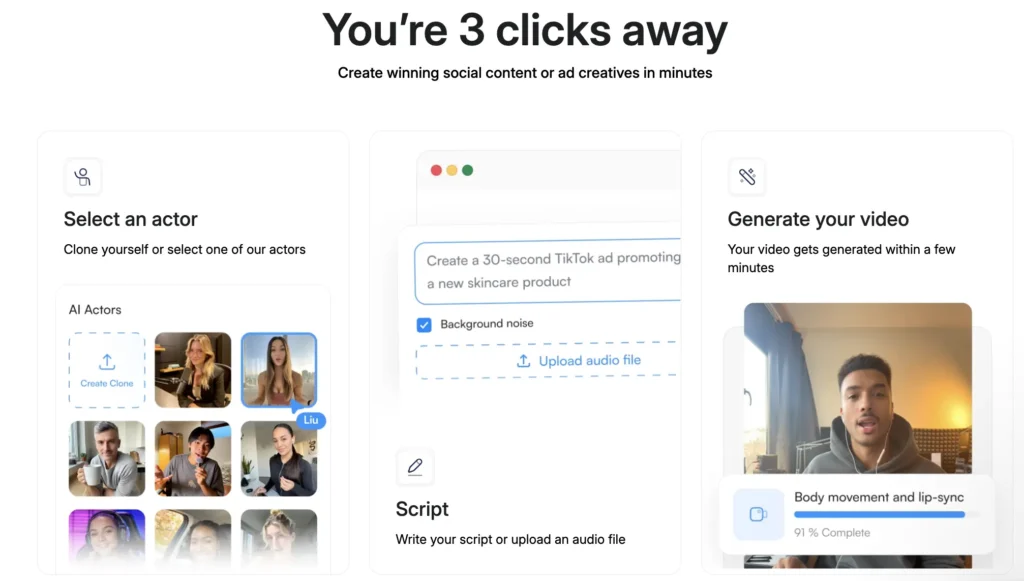
Step 2: Generate First Frames
Every shot needs a starting image.
Don’t be overwhelmed. Super simple process.
Using Speel Actor Library:
Step 1: Sign up for free trial
Step 2: Browse actor library
- Tons of realistic actors
- Different ages, genders, ethnicities
- Or upload your own
Step 3: Pick one actor Choose who fits your brand. Stick with them.
Step 4: Edit images for each shot
Use Nano Banana prompt GPT. Just describe what you want:
- “Woman holding product”
- “Person looking upset with dry skin”
- “Close-up touching face”
Step 5: Generate 4 variations Pick your favorite. That’s your first frame.
Pro tip: Always edit base actor. Not generated images. Maintains consistency.
Example shots created:
- Woman holding Rhode product
- Person with dry skin looking sad
- Close-up touching moisturized skin
- Happy reaction after using product
Character stays perfectly consistent. Mind-blowing.
Step 3: Create A-Roll (Talking Clips)
A-roll = Actor talking directly to camera.
You see them. You hear them speak.
Using Speel Custom Mode:
Step 1: Upload first frame
Step 2: Paste script line Copy from your shot list. Paste exactly.
Step 3: Choose voice
Text-to-Speech options:
- Every accent imaginable
- American, British, Australian
- Male, female voices
- Young, mature, professional
- 50+ languages supported
Preview voices. Pick perfect match.
Step 4: Add simple prompt “Talking naturally with relaxed hand gestures”
That’s it. No overthinking needed.
Step 5: Generate video
Supports up to 60 seconds. Full minute of talking.
Generate multiple simultaneously. Don’t wait. Start next one immediately.
Step 4: Create B-Roll (Supporting Shots)
B-roll = Actor doing things. Voice overlay plays.
Makes ads way more engaging. Tells better story.
Using Speel Easy Mode:
Why Easy Mode for B-roll:
- Better complex motion
- More cinematic shots
- Dynamic camera movement
- 8 seconds max (perfect for quick cuts)
Process:
Step 1: Upload first frame
Step 2: Use B-roll GPT Describe simple action: “Person applying cream to face”
GPT returns detailed cinematic prompt:
- Lighting details
- Camera angles
- Motion descriptions
- Professional direction
Step 3: Generate
B-roll shot examples:
- Product application close-up
- Before/after transformations
- Product on counter
- Lifestyle shots
- Hand gestures
- Emotional reactions
Pro tip: Speed up B-roll 20%. Hides small AI imperfections. Looks more realistic.
Step 5: Edit Everything Together
Pull it all together. Create final ad.
Using CapCut (Free):
Step 1: Import all clips Every A-roll and B-roll shot.
Step 2: Build timeline Follow your shot list. Drag and drop.
Step 3: Apply editing rules
Three critical tips:
Tip 1: High Pacing Lots of small clips. Many cuts. Never boring.
Tip 2: Speed Up B-Roll Even 20% helps. Looks more professional.
Tip 3: Cover Imperfections Lip-sync slightly off? Show B-roll during that part.
Step 4: Add sound effects
Use 11Labs Sound Effects (free):
- Type what you need
- Set length
- Generate instantly
- Download and add
Step 5: Match voices
Different voice between easy and custom mode?
Use 11Labs Voice Changer:
- Upload all clips
- Select target voice
- Convert everything
- Perfect consistency
Step 6: Export and test
Download final video. Ready to run as ad.
Speel AI Features Deep Dive
Actor Library
Massive selection available.
Choose from:
- Different ages (18-65+)
- All genders
- Multiple ethnicities
- Various styles
- Professional looks
- Casual appearances
Or upload your own:
- Use real person (with permission)
- Use model photos
- Create custom avatar
Consistency guaranteed. Same actor every frame.
Easy Mode
Best for: Simple talking videos and complex motion
Features:
- Upload image
- Add prompt
- Select voice
- Generate automatically
- 8 seconds max
- Great motion quality
Perfect for:
- Hooks
- B-roll shots
- Quick cuts
- Dynamic scenes
Custom Mode
Best for: Longer talking scenes
Features:
- Upload image
- Add script
- Text-to-speech options
- Voice changer included
- Record your own voice
- Up to 60 seconds
- More control
Perfect for:
- Main talking scenes
- Detailed explanations
- Story sections
- Long-form content
Nano Banana Integration
Built-in image editor.
Edit any aspect:
- Holding products
- Facial expressions
- Background changes
- Clothing updates
- Pose adjustments
Upload reference images. AI matches perfectly.
Voice Options
Incredible voice library.
50+ languages:
- English (US, UK, AU, etc.)
- Spanish
- French
- German
- Japanese
- Mandarin
- And many more
Multiple accents per language: American English has 20+ voice options alone.
Quality levels:
- Standard voices (good)
- Premium voices (better)
- Studio quality (best)
Voice Changer
Make all voices consistent.
Upload different audio clips. Select target voice. Everything converts.
Also lets you:
- Record your voice
- Transform to any character
- Maintain your tone
- Change accent only
Perfect for brand consistency.
Custom GPTs You Need
Creator built three powerful GPTs. All free to use.
Script Writing GPT
Writes viral ad scripts.
Trained on:
- Successful brand campaigns
- Viral UGC ads
- Proven frameworks
- High-converting copy
Ask questions. Get complete scripts. Add your touch.
Nano Banana Prompt GPT
Optimizes image editing prompts.
You describe simply: “Hold product”
Returns detailed prompt: “Woman holding skincare product in right hand, natural grip, product label visible, warm lighting, slight smile, eye contact with camera, clean background”
Better results automatically.
B-Roll Prompt GPT
Creates cinematic B-roll prompts.
You describe: “Applying cream”
Returns professional prompt: “Close-up shot of hands gently massaging luxurious cream into skin, soft focus on texture absorption, warm golden hour lighting streaming from left, shallow depth of field, smooth camera push-in, emphasizing product effectiveness through visible skin transformation”
Hollywood-quality descriptions.
All three GPTs linked in description. Creator shares freely.
Real Results and Examples
Actual ads created. Real performance.
Example 1: Rhode Beauty Ad
Product: Barrier Butter moisturizer Actor: AI-generated woman Length: 35 seconds Scenes: 8 different shots
Script highlights:
- “Wait why did no one tell me this is the secret to Hayley Bieber skin?”
- “My skin was so dry it actually hurt to smile”
- “This brought it back overnight”
- “Woke up looking like a glazed donut”
Result: Looks completely real. Professional quality. Ready to run.
Example 2: Supplement Ad
Product: Energy supplements Actor: Male AI character Length: 15 seconds
Script: “Well jeez these bad boys are quite something. Firstly they taste amazing and secondly they make me feel more alive than ever. Love em.”
Variations created: 3 different versions Consistency: Perfect across all three
Performance Data
ROAS achieved: 3.6x Cost per video: Under $5 Time to create: 2-3 hours Traditional video cost: $500-2,000
97% cost savings. Same or better results.
Speel Pricing
Surprisingly affordable. Multiple options.
Free Trial
Test everything first.
Includes:
- Unlimited image generation
- Try all features
- Generate test videos
- No credit card needed
Perfect for learning. See if it fits.
Starter Plan
Best for: Testing ads
Price: Contact for pricing
Estimated: $20-30/month
What you get:
- Limited video minutes
- All features access
- Standard voices
- HD export
Good for beginners.
Pro Plan
Best for: Regular ad creation
Price: Contact for pricing
Estimated: $50-100/month
What you get:
- More video minutes
- Priority processing
- Premium voices
- Faster generation
- Multiple projects
Perfect for businesses.
Agency Plan
Best for: Running campaigns for clients
Price: Custom pricing
What you get:
- High video limits
- Team access
- White label options
- API access
- Dedicated support
Scale without limits.
Contact Speel for exact pricing. Plans change based on needs.
Speel vs Competitors
How does it compare?
Speel vs Synthesia
Speel wins:
- Better character consistency
- Easier product integration
- More realistic motion
- Better B-roll creation
Synthesia wins:
- More avatar options
- Better enterprise features
- Longer company history
Verdict: Speel better for e-commerce ads.
Speel vs HeyGen
Speel wins:
- Image editing built-in
- Better for product shots
- More flexible workflows
- Custom GPT integration
HeyGen wins:
- Simpler interface
- Better for presentations
- Easier avatar creation
Verdict: Speel more powerful. HeyGen easier.
Speel vs Pictory
Speel wins:
- AI actors included
- Better for UGC style
- More realistic output
- Product integration
Pictory wins:
- Better for stock footage
- Simpler editing
- More templates
Verdict: Different use cases. Speel for UGC. Pictory for stock.
Speel vs Manual UGC
Speel wins:
- 97% cheaper
- Unlimited variations
- Never runs out
- Scale instantly
- Test everything
Manual wins:
- 100% authentic (sometimes)
- No AI tells
- Unique personalities
Verdict: Speel for most brands. Manual for ultra-premium only.
Who Should Use Speel?
Perfect For:
E-commerce Brands Test product ads fast. Scale winners. Save thousands.
Digital Marketers Create client ads quickly. Test multiple angles. Show results.
Dropshippers Launch products with ads ready. No upfront creator costs.
Agencies Serve more clients. Faster turnarounds. Higher margins.
Startups Limited budget. Need professional ads. Can’t afford influencers.
Course Creators Promote courses. Create testimonial-style ads. Look authentic.
App Developers Show app in action. Create user scenarios. Explain benefits.
SaaS Companies Demo software. Show use cases. Explain features.
Maybe Not For:
Luxury Premium Brands Ultra-high-end may need real celebrities. AI not prestigious enough yet.
Local Service Businesses Need real local faces. Community recognition matters.
B2B Enterprise Decision makers want real executives. AI might hurt credibility.
Personal Brand Influencers You are the brand. Can’t replace yourself.
For most online businesses? Speel is perfect.
Advanced Tips for 3.6x ROAS
Tip 1: Test Multiple Hooks
Create 5 different openings.
Same video. Different first 3 seconds.
Hook variations:
- Question format
- Bold statement
- Shocking reveal
- Relatable problem
- Social proof
Test. Find winner. Scale it.
Tip 2: Follow Viral Frameworks
Use proven structures:
Problem-Agitate-Solution:
- Show problem (5 sec)
- Make it worse (5 sec)
- Present solution (20 sec)
- Call to action (5 sec)
Before-After-Bridge:
- Before state (5 sec)
- After state (5 sec)
- Bridge (product) (20 sec)
- CTA (5 sec)
Tip 3: Match Your Audience
Actor should look like customer.
Selling to moms? Use mom-looking actor. Targeting Gen Z? Use young actor. B2B product? Professional business person.
People trust people like them.
Tip 4: Show Product Early
Within first 5 seconds.
Don’t wait. Show what you’re selling. Then explain why.
Tip 5: Keep It Short
Best performing lengths:
- TikTok: 15-30 seconds
- Instagram: 15-30 seconds
- Facebook: 30-45 seconds
- YouTube: 30-60 seconds
Shorter usually converts better.
Tip 6: Use Captions Always
85% watch without sound.
Add captions. Get 2x more conversions.
CapCut auto-generates. Easy to add.
Tip 7: Create Variation Series
Same script. Different actors.
Test which demographic responds best.
Then scale that specific version.
Tip 8: Speed Up Everything
1.2x speed minimum.
Modern attention spans demand it. Feels more energetic.
Tip 9: Add Sound Effects
Don’t skip audio.
Subtle sounds:
- Product opening
- Application sounds
- Ambient background
- Transition whooshes
Makes it feel more real.
Tip 10: Test, Test, Test
Create 10 variations.
Different:
- Hooks
- Actors
- Scripts
- Lengths
Find winners. Kill losers. Scale successes.
Common Mistakes to Avoid
Mistake 1: Making Videos Too Long
Nobody watches 2-minute ads.
Keep it under 45 seconds. Preferably 30.
Mistake 2: Weak Hooks
First 3 seconds matter most.
Boring hook = everyone scrolls. Make it punchy.
Mistake 3: Inconsistent Character
Switching actors mid-video looks weird.
Stick with one. Edit base image only.
Mistake 4: Slow Pacing
Too many long shots = boring.
Cut every 2-4 seconds. Keep energy high.
Mistake 5: Ignoring Audio Quality
Good video + bad audio = disaster.
Use quality voices. Add sound effects. Balance levels.
Mistake 6: No Clear CTA
People need to know what to do.
“Shop now” “Get yours” “Link in bio”
Make it obvious.
Mistake 7: Not Testing Variations
Running one video = leaving money on table.
Always test multiple versions. Data tells truth.
Mistake 8: Obvious AI Tells
Weird hand movements? Cut to B-roll.
Cover imperfections. Nobody notices.
Workflow Optimization
Batch Production
Create multiple ads at once.
Efficient process:
- Write 10 scripts (1 hour)
- Generate all first frames (1 hour)
- Create all A-roll (2 hours)
- Create all B-roll (1 hour)
- Edit all videos (3 hours)
10 ads in 8 hours. Versus weeks traditionally.
Organization System
Use Notion or similar.
Track:
- Scripts
- Shot lists
- Generated images
- Video clips
- Performance data
Stay organized. Scale efficiently.
Template Your Process
Create reusable templates.
Shot list template. Script template. Editing template.
Copy and modify. Save hours.
Integration with Ad Platforms
Facebook Ads
Format for success:
- Square (1:1) or vertical (4:5)
- Add captions
- Attention-grabbing thumbnail
- 15-30 seconds
Upload directly. Run campaigns.
TikTok Ads
Native feel crucial:
- Vertical only (9:16)
- Fast pacing
- Trending audio (if possible)
- Under 30 seconds
Make it blend with organic content.
Instagram Ads
Multiple placements:
- Feed: Square or vertical
- Stories: Vertical only
- Reels: Vertical only
Optimize for each placement.
YouTube Ads
Different strategy:
- Can be longer (30-60 sec)
- Skip button after 5 sec
- Hook in first 3 sec
- Clear CTA at end
More room for storytelling.
Measuring Success
Key Metrics
Track these:
ROAS (Return on Ad Spend) Goal: Minimum 2x. Great: 3x+. Excellent: 5x+.
CTR (Click-Through Rate) Goal: 1%+. Great: 2%+. Excellent: 3%+.
CPC (Cost Per Click) Lower is better. Industry varies.
Conversion Rate Goal: 2%+. Great: 5%+. Excellent: 10%+.
Hook Rate Percentage who watch past 3 seconds. Goal: 50%+.
Watch Time Higher = better. Goal: 75%+ completion.
A/B Testing Framework
Test one variable at a time:
Week 1: Test 5 different hooks Week 2: Test 3 different actors (winning hook) Week 3: Test 3 script variations (winning hook + actor) Week 4: Test 2 CTAs (winning everything)
Compound improvements. Massive results.
Common Questions About Speel
Is Speel free? Free trial available. Unlimited image generation. Limited video generation.
Do videos look fake? No. With proper process, indistinguishable from real UGC.
Can I use for any niche? Yes. Beauty, supplements, fashion, tech, courses. Everything works.
How long to create one ad? First time: 2-3 hours. With practice: 30-60 minutes.
Do I need editing skills? Basic skills help. But GPTs do heavy lifting. CapCut is simple.
Can I monetize these ads? Yes. Run them as paid ads. Sell as service. Use for clients.
What if people notice it’s AI? They usually don’t. If questioned, be honest. Many brands openly use AI now.
How many variations should I test? Start with 5-10. Find winner. Create more variations of winner.
Does it work for all products? Best for: Physical products, digital products, services. Harder for: Enterprise B2B, luxury goods.
Can I use real voice? Yes. Record yourself. Use voice changer to match character.
What resolution is export? HD quality. 1080p. Good for all platforms.
Can I edit after generation? Yes. Edit in any software. CapCut, Premiere, Final Cut.
Future of AI UGC Ads
Technology improving rapidly.
Coming soon:
- Even better lip-sync
- Longer video support
- More actor options
- Better motion quality
- Real-time generation
Industry shift happening: More brands adopt AI. Costs drop further. Quality increases.
Early adopters win biggest. Start now.
Getting Started Action Plan
Today:
Step 1: Sign up Speel free trial Test features. Generate images. Explore interface.
Step 2: Access custom GPTs Get script writer. Get prompt optimizers. Bookmark them.
Step 3: Choose one product Pick simplest product. Start there. Learn process.
This Week:
Step 4: Write first script Use GPT. Follow framework. Keep it simple.
Step 5: Create shot list Plan every scene. A-roll and B-roll. Organize in Notion.
Step 6: Generate first frames Pick actor. Create all first images. Check consistency.
This Month:
Step 7: Create complete ad Follow 5-step process. Edit everything. Export final video.
Step 8: Run as ad Start with $50 budget. Test on best platform. Monitor metrics.
Step 9: Analyze results Check ROAS. See what works. Create variations.
Step 10: Scale winners Found good ROAS? Create more versions. Increase budget.
Long Term:
Build ad library. 50-100 variations. Always testing. Always improving.
Optimization never stops. Market changes. Audience evolves. Keep creating.
My Final Verdict
Speel changes e-commerce advertising forever.
What makes it incredible:
- 97% cost savings vs traditional UGC
- 3.6x ROAS proven
- Realistic AI actors
- Perfect character consistency
- World’s best lip-sync
- Easy and powerful modes
- Nano Banana integration
- Custom GPTs included
- Fast generation
- Unlimited testing
Minor limitations:
- 8-second limit (easy mode)
- Learning curve exists
- Not perfect for luxury brands
- Some AI tells if you look close
Bottom line: Best tool for creating UGC-style ads at scale. Perfect for e-commerce, DTC brands, and digital marketers. The 97% cost savings alone makes it worth it. 3.6x ROAS proves it works. Big brands using it validates the approach.
Score Card
Ease of Use: 8.5/10 Output Quality: 9.5/10 Character Consistency: 10/10 Value for Money: 10/10 Feature Set: 9.5/10 Results (ROAS): 10/10 Overall: 9.6/10
Verdict: Revolutionary tool for e-commerce advertising. The ability to create unlimited UGC-style ads without hiring creators is game-changing. Proven 3.6x ROAS makes it essential for any serious brand. Custom GPTs eliminate the skill barrier. Early adopters gaining massive advantage over competitors.