
Tired of spending hours making videos? Pictory AI creates professional videos from text in minutes.
No filming. No editing skills. Just paste your words. Get stunning videos.
This honest review shows you everything. Features. Pricing. Real tests. What works and what doesn’t.
What Is Pictory AI?
Pictory AI is a video creation tool. It turns text into videos automatically.
Think of it like this: You write. AI makes the video. Simple as that.
No need for:
- Expensive cameras
- Video editing skills
- Actors or presenters
- Studio equipment
- Hours of editing
Just your words. That’s all.
Why Pictory AI Is Different
Most video tools need skills. Pictory doesn’t.
What makes it special:
Text to Video Magic Type or paste text. Get video with visuals, voiceover, and music. All automatic.
Blog Post Converter Have blog articles? Turn them into videos. Drive more traffic.
AI Video Editor Edit videos by editing text. Remove “ums” and “ahs” automatically.
Complete Toolkit Everything included. Stock videos. Music. Voiceovers. Captions. One tool.
Six Ways to Create Videos
Pictory gives you multiple options. Pick what fits your needs.
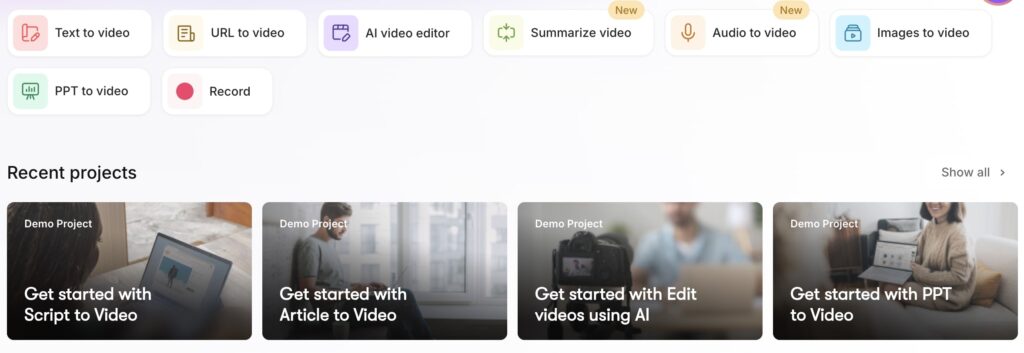
1. Text to Video
Most popular feature.
Paste any script. Pictory creates complete video.
What you get:
- Visual scenes
- Background music
- AI voiceover
- Automatic captions
- Smooth transitions
Perfect for:
- Marketing videos
- YouTube content
- Social media posts
- Product explainers
- Course materials
2. URL to Video
Repurpose existing content.
Drop in any link:
- Blog post URL
- YouTube video
- Online article
- News story
Pictory creates short summary video. Great for content marketing.
Use cases:
- Promote blog posts
- Create teasers
- Social media snippets
- Email marketing
- Quick summaries
3. AI Video Editor
Revolutionary editing method.
Upload your video. Pictory creates text transcript. Edit video by editing text.
Amazing features:
- Remove filler words (um, ah, like)
- Delete awkward pauses
- Cut bad takes
- Rearrange sections
- No timeline editing
Perfect for:
- Zoom recordings
- Webinars
- Podcasts
- Interviews
- Long videos
4. Images to Video
Turn photos into videos.
Upload images or short clips. Pictory creates slideshow.
Automatic additions:
- Smooth transitions
- Background music
- Text overlays
- Professional timing
Great for:
- Portfolios
- Testimonials
- Event recaps
- Real estate
- Product showcases
5. PowerPoint to Video
Convert presentations instantly.
Have PowerPoint slides? Drop them in.
Pictory adds:
- Professional voiceover
- Background music
- Smooth animations
- Video format
Perfect for:
- Educators
- Training materials
- Business presentations
- Course content
- Sales pitches
6. Screen Recorder
Record and create simultaneously.
Record screen, webcam, or both together.
Built-in recorder saves time:
- Training videos
- Software tutorials
- Internal communications
- Product demos
- How-to guides
No separate recording software needed.
Text to Video: Deep Dive
Let’s explore the most popular feature in detail.
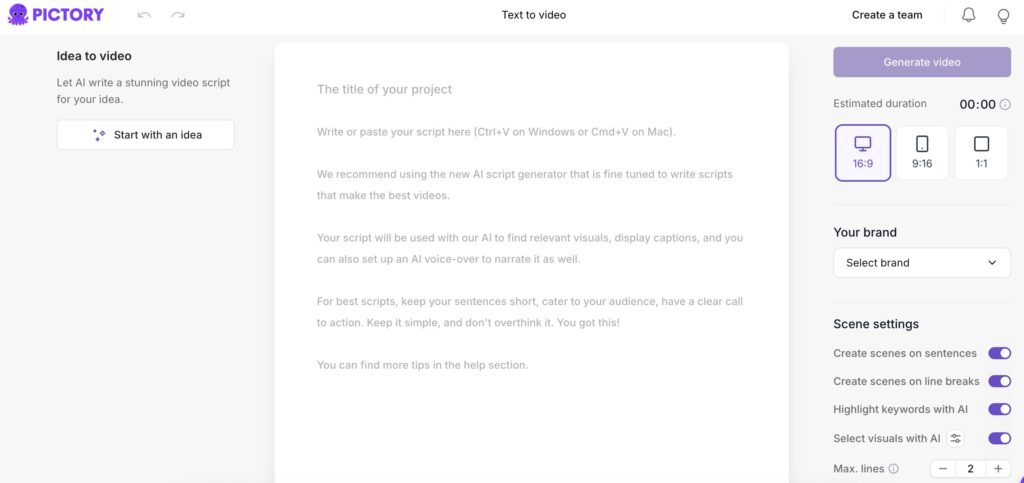
Step 1: Create Your Script
Three options:
Option A: Use AI Script Generator
- Click “Start with an idea”
- Type your topic
- Choose video type
- Select tone
- AI writes script
Option B: Paste Your Script
- Copy from ChatGPT
- Use your blog post
- Paste email content
- Add any text
Option C: Write Manually Type directly. Full control over words.
Step 2: Optimize Script
Built-in tools help:
Video Type Options:
- Explainer videos
- Marketing content
- Internal communication
- Tutorial videos
- Product demos
Tone Selection:
- Professional
- Conversational
- Academic
- Training
- Casual
Script Editing:
- Shorten automatically
- Lengthen content
- Improve clarity
- See estimated length
Step 3: Choose Format
Three aspect ratios:
Horizontal (16:9)
- YouTube videos
- Website content
- Facebook posts
- LinkedIn videos
Vertical (9:16)
- TikTok videos
- Instagram Reels
- YouTube Shorts
- Snapchat content
Square (1:1)
- Instagram feed
- Facebook posts
- Twitter videos
- General social media
Step 4: Generate Video
Click generate. Wait a few minutes.
Generation time depends on:
- Script length
- Video complexity
- Server load
Usually 2-5 minutes. Much faster than manual creation.
Step 5: Review Storyboard
Video appears in storyboard view.
Left side: Script scenes Right side: Selected video clips
Each text line gets matching visual. AI picks automatically.
Customizing Your Video
Video generated. Now make it yours.
Changing Visuals
Don’t like a clip? Swap it easily.
Huge stock library includes:
- Storyblocks videos
- Getty Images (Pro plan)
- Millions of clips
- HD quality footage
- Royalty-free content
Search by keyword: Type anything. Find perfect visuals. Click to replace.
Smart suggestions: AI suggests relevant clips. Saves searching time.
Upload your own: Have custom footage? Add it. Mix with stock clips.
Adding Music
Massive music library.
Filter by:
- Mood (happy, serious, calm)
- Purpose (corporate, vlog, dramatic)
- Genre (pop, jazz, electronic)
Preview instantly: Click any track. Hear it immediately.
Volume control: Adjust music level. Don’t overpower voiceover.
No music option: Want silence? Turn off completely.
AI Voiceover Options
Tons of AI voices available.
Choose by:
- Language (50+ languages)
- Accent (regional variations)
- Gender (male, female, neutral)
- Age (young, mature, elderly)
- Purpose (professional, friendly, authoritative)
Popular voices:
- Annabelle (friendly female)
- Matilda (professional female)
- James (authoritative male)
- Oliver (casual male)
Voice quality: Natural sounding. Not robotic. Premium voices on Pro plan.
Preview before applying: Test different voices. Pick your favorite.
Custom Voiceover
Prefer your own voice?
Three options:
Record directly:
- Click microphone button
- Record through browser
- Multiple takes allowed
Upload existing:
- Add MP3 files
- Use WAV format
- Import from anywhere
Mix both: Use AI for some parts. Your voice for others.
Caption Customization
Automatic captions included.
Control everything:
- Turn on/off
- Change position
- Modify style
- Adjust colors
- Pick fonts
- Add animations
Caption styles: Multiple presets available. Create custom styles too.
Why captions matter:
- 85% watch without sound
- Better accessibility
- Higher engagement
- Improved SEO
Brand Kit Feature
Keep branding consistent.
Add your:
- Company logo
- Brand colors
- Custom fonts
- Watermarks
- Templates
Save once. Apply to all videos. Professional look guaranteed.
Background Options
Change video backgrounds:
- Solid colors
- Gradient effects
- Custom images
- Video backgrounds
Match your brand. Stand out online.
Graphics and Titles
Enhance your video:
- Add text overlays
- Insert graphics
- Create lower thirds
- Include CTAs
- Design end screens
Drag and drop. Super simple.
Export and Sharing
Video perfect? Time to share.
Download Options
Two export formats:
MP4 Video: Standard video file. Works everywhere. Upload anywhere.
Resolution: Maximum 1080p (Full HD). Good for most platforms.
Processing time: Few minutes usually. Depends on length.
Background processing: Start another project. Video exports separately.
Direct Sharing
Share link instantly:
Copy shareable link. Send to anyone. No download needed.
Perfect for:
- Client reviews
- Team feedback
- Quick sharing
- Social media
Publishing Features
Coming soon: Direct publishing to YouTube, Facebook, Instagram.
Currently: Download then upload manually.
Pictory AI Pricing Plans
Affordable for everyone. Multiple options available.
Free Trial
14 days completely free.
No credit card required:
- Test all features
- Create real videos
- Try different options
- See if it fits
Risk-free trial. Cancel anytime.
Starter Plan
Best for: Beginners and small creators
Price: $19/month (annually) Price: $23/month (monthly)
What you get:
- 200 minutes video/month
- Text to video
- URL to video
- AI video editor
- Storyblocks library access
- Standard AI voices
- 7 languages
- Automatic captions
- Music library
- 1080p export
Perfect for:
- Solo creators
- Small businesses
- Bloggers
- Educators
- Freelancers
Professional Plan
Best for: Serious content creators
Price: $39/month (annually) Price: $47/month (monthly)
Everything in Starter plus:
- 600 minutes video/month
- Getty Images access
- Premium AI voices (11 Labs)
- 11 languages
- Brand kit
- API access
- Priority support
- Faster processing
Perfect for:
- Marketing agencies
- Growing businesses
- YouTubers
- Course creators
- Regular video needs
Teams Plan
Best for: Organizations
Price: Custom pricing Minimum: 3 users
Everything in Professional plus:
- 1,800 minutes video/month
- Multiple users
- Shared brand kits
- Team collaboration
- Admin controls
- Bulk processing
- Dedicated support
Perfect for:
- Marketing teams
- Agencies
- Enterprises
- Educational institutions
Special Discount
Use code: KIMBERLY20 Get: 20% off any plan for life
Applies to monthly and annual plans. Huge savings.
Pictory AI vs Competitors
How does it compare?
Pictory vs Descript
Pictory wins:
- Easier to use
- Better for beginners
- Faster video creation
- More stock footage
Descript wins:
- Better for podcasts
- More editing control
- Transcription accuracy
- Advanced features
Verdict: Pictory better for marketing videos. Descript better for podcasts.
Pictory vs InVideo
Pictory wins:
- Cleaner interface
- Better AI features
- Simpler workflow
- Faster generation
InVideo wins:
- More templates
- More customization
- Social media tools
Verdict: Pictory easier. InVideo more features.
Pictory vs Synthesia
Pictory wins:
- More affordable
- Stock footage included
- Better for variety
- Multiple input types
Synthesia wins:
- AI avatars
- More languages
- Enterprise features
Verdict: Pictory better value. Synthesia better for AI presenters.
Pictory vs Lumen5
Pictory wins:
- Better AI voices
- More features
- Better editing tools
- Professional output
Lumen5 wins:
- Social media focus
- Quick posting
Verdict: Pictory more powerful. Lumen5 simpler.
Price Comparison
Pictory: $19/month Descript: $24/month InVideo: $25/month Synthesia: $29/month Lumen5: $29/month
Pictory offers best value.
Real Performance Tests
I created actual videos. Here are results.
Test 1: Blog Post Conversion
Source: 1,500-word blog article Time taken: 8 minutes Result: 3-minute video
Quality: Excellent visual matching. Good voiceover. Relevant clips throughout.
Needed changes: Swapped 2 generic clips. Adjusted music volume.
Final verdict: 90% perfect automatically.
Test 2: Script to Video
Source: Written script (500 words) Time taken: 5 minutes Result: 2-minute explainer video
Quality: Perfect scene selection. Natural voiceover. Professional look.
Needed changes: Changed one background. Added logo.
Final verdict: 95% perfect automatically.
Test 3: PowerPoint Conversion
Source: 10-slide presentation Time taken: 7 minutes Result: 4-minute video
Quality: Smooth transitions. Clear narration. Good pacing.
Needed changes: Adjusted timing on 2 slides.
Final verdict: 85% perfect automatically.
Test 4: Video Editing
Source: 30-minute Zoom recording Time taken: 15 minutes editing Result: Clean 10-minute video
Quality: Removed all filler words. Deleted pauses. Smooth flow.
Needed changes: Manual cut of one section.
Final verdict: Saved hours of timeline editing.
Pictory AI Pros (The Good Stuff)
Pro 1: Complete Toolkit
Everything in one place:
- Video creator
- Script generator
- Screen recorder
- Stock library
- AI voices
- Music collection
- Caption generator
No need for other tools.
Pro 2: Easy to Learn
Simple interface.
Beginners create videos in minutes. No training needed.
Clear instructions. Helpful tooltips. Intuitive design.
Pro 3: Affordable Pricing
Cheapest in its category.
$19/month includes Storyblocks ($30 value). Incredible deal.
Pro 4: Time Saver
Manual video creation: 4-6 hours Pictory AI: 5-10 minutes
Save 95% of your time.
Pro 5: No Technical Skills
Don’t need to know:
- Video editing
- Camera work
- Lighting setup
- Audio mixing
- Color grading
Just type. Get video.
Pro 6: Stock Library Included
Massive media library:
- Storyblocks videos
- Getty Images (Pro)
- Millions of clips
- Royalty-free music
- HD quality
Worth hundreds of dollars. Included free.
Pro 7: Multiple Languages
50+ languages supported.
Create videos for global audience. Reach more people.
Pro 8: Automatic Captions
Built-in subtitles.
85% people watch without sound. Captions crucial.
Multiple styles. Easy customization.
Pro 9: Brand Consistency
Brand kit saves templates.
Logo, colors, fonts saved. Apply to all videos.
Professional look. Every time.
Pro 10: Fast Processing
Videos generate quickly.
Usually 2-5 minutes. Some competitors take 30+ minutes.
Pictory AI Cons (The Not-So-Good)
Con 1: Generic Clips Sometimes
AI picks visuals automatically. Sometimes misses the mark.
Example: Script says “stepping into painting.” AI shows sidewalk art.
Solution: Easy to swap. Takes extra minute.
Verdict: Minor inconvenience. Not dealbreaker.
Con 2: Maximum 1080p Resolution
Can’t export 4K.
Stuck at Full HD. Most YouTube videos are 1080p anyway.
Good enough for:
- YouTube
- Social media
- Websites
- Most needs
Not good for:
- Cinema production
- 4K TVs exclusively
- Ultra-HD requirements
For 95% of users? 1080p is fine.
Con 3: Limited AI Video Generation
Can’t create elaborate AI scenes.
No “cat astronaut in space” videos. No impossible scenarios.
Uses stock footage only. Real videos of real things.
Verdict: Focus different than TikTok AI. Targets businesses instead.
Con 4: Learning Curve for Advanced Features
Basic use is simple. Advanced customization takes time.
Takes practice:
- Complex editing
- Brand kit setup
- API integration
- Team management
Most users never need advanced features.
Con 5: Internet Required
Cloud-based tool. Needs internet connection.
Can’t work offline. Need stable connection.
Not a problem if:
- You have WiFi
- Internet reliable
- Work online anyway
Who Should Use Pictory AI?
Perfect For:
Content Creators Turn scripts into videos. Scale production. Post more often.
Bloggers Convert articles to videos. Drive more traffic. Rank better.
Marketers Create ads quickly. Test different versions. Launch campaigns faster.
Educators Make course videos. Explain concepts visually. Engage students better.
Business Professionals Internal communications. Training videos. Company updates.
Social Media Managers Daily content creation. Multiple platforms. Quick turnarounds.
YouTubers Increase posting frequency. Try new formats. Test ideas fast.
Coaches and Consultants Client videos. Course materials. Marketing content.
Real Estate Agents Property videos. Neighborhood tours. Listing highlights.
E-commerce Sellers Product videos. How-to guides. Customer testimonials.
Maybe Not For:
Hollywood Filmmakers Need higher production quality. Want 4K resolution. Require custom everything.
Elaborate Animation Needs Want complex 3D. Need custom characters. Require special effects.
Pure AI Generation Seekers Want impossible scenarios. Need fantasy scenes. Require AI-generated everything.
Offline Workers No internet available. Need desktop software. Can’t use cloud tools.
For most business users? Pictory is perfect.
Tips for Best Results
Tip 1: Write Good Scripts
Clear structure helps:
- Strong opening
- Clear points
- Smooth transitions
- Strong ending
Better script = better video.
Tip 2: Be Specific
Detailed descriptions work better.
Instead of: “Show happy people” Write: “Group of friends laughing at cafe”
AI finds better matches.
Tip 3: Review All Visuals
Don’t accept first version.
Check every scene. Swap generic clips. Find perfect matches.
Extra 5 minutes improves quality 50%.
Tip 4: Balance Audio Levels
Music too loud drowns voiceover.
Set voiceover: 100% Set music: 10-20%
Test before exporting.
Tip 5: Use Captions
Always include subtitles.
People watch without sound. Captions increase engagement.
Tip 6: Keep Videos Short
Attention spans are short.
Aim for:
- Social media: 30-60 seconds
- YouTube: 2-5 minutes
- Training: 5-10 minutes
Shorter = better engagement.
Tip 7: Test Different Voices
Preview multiple narrators.
Different voices for different topics:
- Serious topics: Mature voice
- Fun content: Young voice
- Professional: Authoritative voice
Tip 8: Brand Everything
Set up brand kit early.
Add logo. Set colors. Choose fonts.
Saves time on every video.
Tip 9: Batch Create
Make multiple videos at once.
Process 5-10 simultaneously. Much more efficient.
Tip 10: Repurpose Everything
One blog post = 5 videos:
- Full summary
- Key point #1
- Key point #2
- Key point #3
- Quick teaser
Maximum content from minimum effort.
Common Questions About Pictory AI
Is Pictory AI really easy to use? Yes. Beginners create videos in minutes. Very intuitive.
Do I need video editing skills? No. Everything automatic. Click and create.
Can I use my own footage? Yes. Upload videos and images. Mix with stock.
Is the stock footage really included? Yes. Storyblocks included in Starter. Getty in Professional.
How many videos can I make? Unlimited videos. Limited by monthly minutes only.
Can I cancel anytime? Yes. No long-term commitment. Cancel when you want.
Do videos look professional? Yes. HD quality. Professional stock footage. Natural voiceovers.
Can I edit after generating? Yes. Change anything. Swap clips. Adjust timing.
Is there a watermark? No watermark on paid plans. Clean exports.
Can multiple people use one account? Teams plan supports multiple users. Other plans single user.
Does it work on mobile? Web-based. Works on any device with browser.
Can I monetize videos on YouTube? Yes. You own the videos. Monetize freely.
Getting Started with Pictory
Your step-by-step action plan.
Today:
Step 1: Start free trial Visit Pictory website. No credit card needed.
Step 2: Choose creation method Pick text to video. Easiest starting point.
Step 3: Create first video Use AI script generator. Generate video. Download.
This Week:
Step 4: Try all features Test URL to video. Try image slideshow. Experiment with editor.
Step 5: Convert blog posts Turn existing content into videos. Repurpose everything.
Step 6: Set up brand kit Add logo and colors. Save templates.
This Month:
Step 7: Create content calendar Plan regular video posts. Schedule creation times.
Step 8: Optimize workflow Find fastest method. Create templates. Batch process.
Step 9: Measure results Track engagement. Compare to other content. Adjust strategy.
Step 10: Upgrade if needed Running out of minutes? Upgrade to Professional.
My Final Verdict
Pictory AI delivers on promises.
What makes it great:
- Easiest video creation
- Complete toolkit included
- Affordable pricing
- Stock library worth hundreds
- Natural AI voices
- Fast processing
- Professional results
Minor drawbacks:
- Sometimes generic clips
- Only 1080p resolution
- Not for elaborate AI scenes
Bottom line: Best value for business video creation. Perfect for content creators, marketers, and educators. Saves massive time and money.
Score Card
Ease of Use: 10/10
Features: 9/10
Video Quality: 8.5/10
Value for Money: 10/10
Speed: 9.5/10
Stock Library: 10/10
Overall: 9.5/10
Verdict: Best AI video creator for businesses and content creators who need professional videos fast without technical skills. The $19/month starter plan with included Storyblocks access is unbeatable value.